

Summary: Construction Lenders will need to see your cost of construction spreadsheet. They want to be assured that your construction budget is adequate.
Carl, My cost estimating spread sheet (the byoh one) only has about 36 rows for cost estimating.
I’ll need about 50 rows. How do I add rows?
Incidentally, I’m about 3/5th’s through and I am having a surprisingly good time, much in part to your book, although building in south Louisiana is different than in north Louisiana.
Thanks, Robert
Hi Robert,
Sorry, you can’t add rows to the byoh.com spreadsheet.
The software was developed for me based on the excel version that is also on byoh.com.
The excel version is also limited to 36 rows. The reason for row limitation is that the spreadsheets were designed for Construction Lenders as well as Home Builders. Construction Lenders want to see you have your costs covered, they just don’t want to see the excruciating minutia that goes into each category of cost estimating.
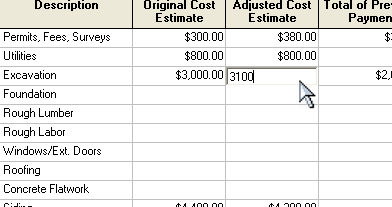
Here is what I suggest in Chapter 3 of my eBook, “Build or Remodel Your Own House”:
"You can make as many spread sheets for subcategories within the line items as you need. For example: House Foundation costs may be made up of several costs such as sand, fill dirt, steel reinforcing, forms, etc.
Simply start a new spreadsheet, label it "Foundation," and change the list of costs by typing in what you need. The pre-typed ones can be overwritten.
Do a new spreadsheet for each "Main" category as needed. It's easy!"
Here's a PDF of the excel version from www.byoh.com
Of course, you could format your own excel spreadsheet with as many rows as you want.
Thanks for writing and good luck, Carl Heldmann
